
Adding a rechargeable handlebar headlight to your scooter enhances visibility and safety during night rides. This guide will walk you through unboxing, installation, charging, and operation.
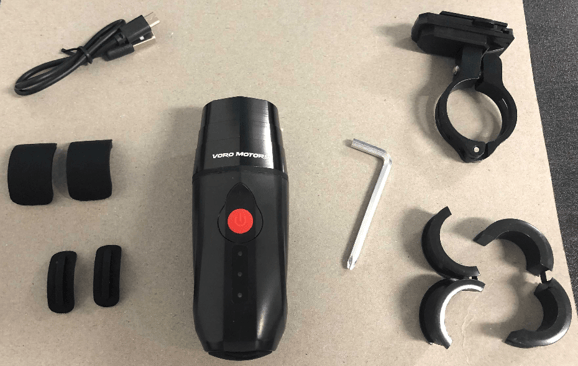
What’s in the Box
-
Headlight
-
USB charging cable
-
Headlight-to-handlebar mount
-
Allen wrench
-
2 plastic handlebar adaptors
-
4 rubber handlebar adaptors
Step 1: Fastening the Mount to the Scooter
Mounting the headlight can be a bit tricky depending on your scooter model:
-
Loosen the screw on the mount using the included Allen wrench.
-
Wrap the looped part of the bracket around the handlebar where you want the headlight, with the longer side facing the front of the scooter.
-
If there’s a gap between the handlebar and the bracket, use one or more of the plastic/rubber adaptors to fill it.
-
For most scooters, the thicker plastic adaptor is sufficient.
-
-
Some models may require more precise adaptor combinations:
-
Wolf Warrior, King, X Pro: Use the wider plastic adaptor with the skinnier rubber adaptor for 20mm central handlebars.
-
Dualtron Thunder, Thunder II, Storm, Storm LE: Use both rubber adaptors without extrusions on opposite sides of the extended handlebar section.
-
-
Some scooters, like the Roadster, have variable handlebar diameters and may not accommodate this mount securely.
Step 2: Charging the Headlight
-
Remove the protective cover on the back of the light.
-
Connect the USB cable to the light and to a compatible charger.
-
The Cruiser and Touring models allow charging on the move via USB inputs.
-
-
Replace the protective cover when not charging.
Step 3: Mounting the Light
-
Slide the light onto the mount from front to back until you hear a click.
-
To remove the light, press the small button on the left side of the mount and push the light forward.
-
To adjust the angle, slightly loosen the bolt at the back of the mount, adjust the angle, and re-tighten.
Step 4: Operating the Headlight
-
Power Button Functions:
-
First tap: dimmest brightness
-
Second tap: medium brightness
-
Third tap: maximum brightness
-
Fourth tap: rapid flashing mode
-
Fifth tap: cycles back to dimmest
-
-
Turning Off: Press and hold the power button for 2 seconds.
Following these steps ensures a secure installation and proper operation of your handlebar headlight, giving you safer and more visible rides at night.